Factory Presets
All 32 bundled factory programs, grouped into six category menus — what each one does, which controls it changes, and when to reach for it.
Click the preset name under the title bar, or use | < | and
| > | to step through the ring. See Presets for
save/load, Save as Default Preset, user presets, and what gets stored in a project.
Overview
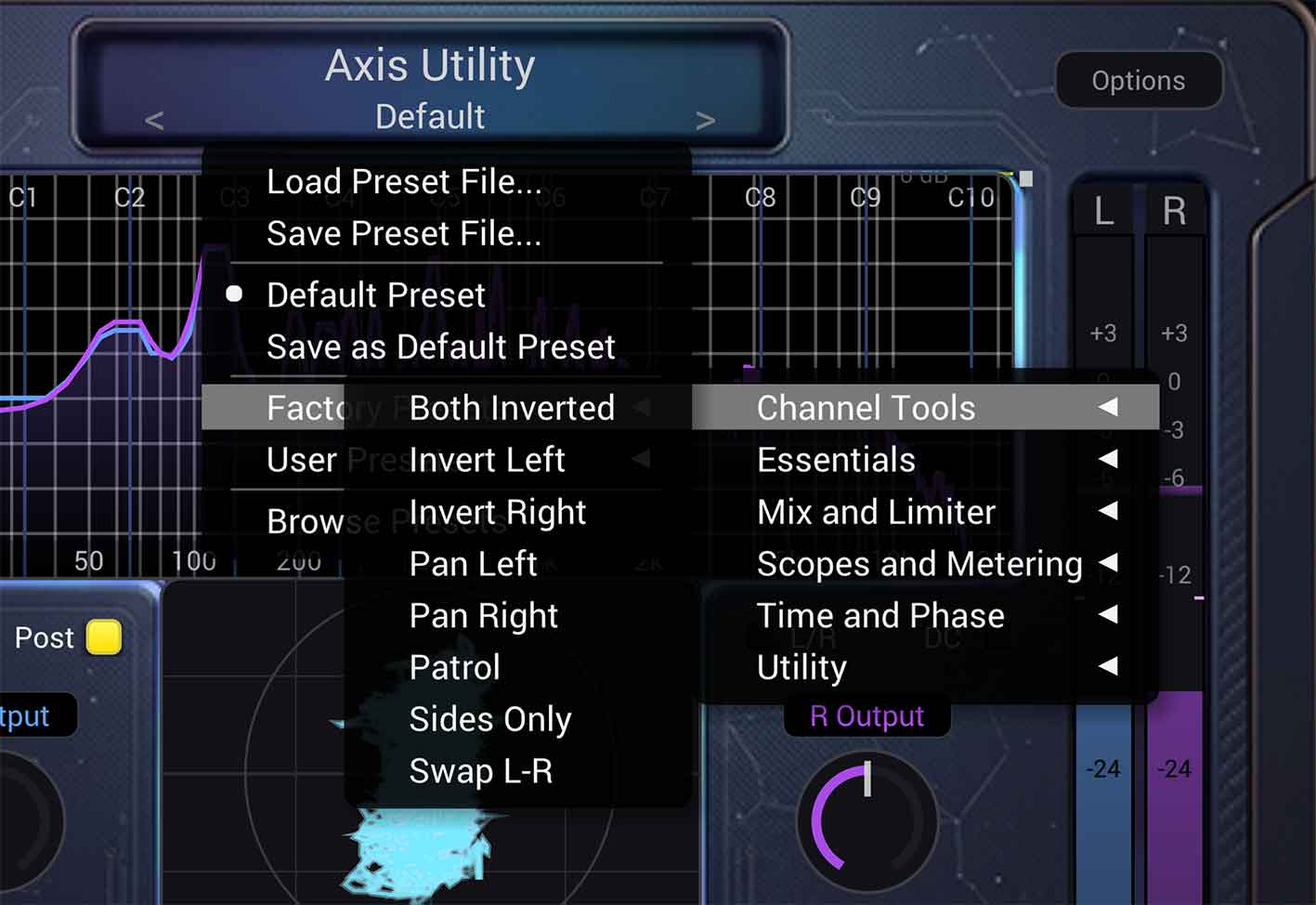
Axis Utility ships with 32 factory programs in category submenus under
Factory Presets, plus a separate Default program on the main preset menu (not listed
under Factory Presets). Each .axpreset file stores the full plugin state: parameters,
channel colours, Options (limiter ceiling, oversampling, metering mode), and analyzer/goniometer view
settings — but not window zoom.
| Item | Details |
|---|---|
| Default | Neutral starting point — all processing at factory defaults, with analyzer
Musical Grid on. Recalled from Default Preset
on the main menu (first step in the preset-arrow ring) unless you have a saved Default
(user_default.axpreset — see Presets).
The factory program forces Listen → ST. |
| Factory programs | 32 named presets in six submenus (tables below). Active preset shows a checkmark; its category folder also shows a checkmark. |
| Preset ring order | Default → factory bank (category sort order) → your user .axpreset files →
back to Default. |
| Bundle location | Contents/Resources/FactoryPresets/ inside each plug-in bundle or standalone app
(33 files: 32 programs + Default.axpreset at bundle root). |
Unless noted below, a preset only changes the controls listed — everything else stays at factory defaults (Post metering, Link on, Mix 100%, limiter off, analyzer Line mode, goniometer Lissajous, and so on).
Essentials
Everyday stereo-image and monitoring starting points.
| Preset | What it changes | Use it when… |
|---|---|---|
| Wide Stereo | Filter on (~200 Hz crossover) · Imager 140% width · limiter off | You want a wider, open stereo field while keeping lows centred and mono-safe. |
| Bass Mono | Filter on (~180 Hz) · Imager 140% width · limiter off | You need tight, mono-compatible bass with widened highs — common on buses and masters. |
| Mono To Stereo | Tilt → Imager (<) · L/R Tilt +8 ms · Filter on (~180 Hz) · Imager 100% | Spreading a mono (or narrow) source: Haas tilt first, then Filter re-monos the lows so the bass stays centred while highs stay wide. |
| Mono Check | Listen → M (mid solo) | Checking mono compatibility — anything that disappears or thins in mid-only is risky in mono. |
| Mid Side | M/S Mode on · gain knobs switch to Mid/Side · goniometer M/S view | Working in the mid/side domain — trim centre vs sides independently and watch the M/S plot. |
Channel Tools
Pan, swap, polarity, and solo tools for fixing or auditioning a stereo pair.
| Preset | What it changes | Use it when… |
|---|---|---|
| Pan Left | Link off · Left output trim 0 dB · Right output trim −6 dB | Biasing level toward the left channel without using the Pan slider. |
| Pan Right | Link off · Left output trim −6 dB · Right output trim 0 dB | Biasing level toward the right channel. |
| Swap L-R | Swap channels on the wet path | Fixing a reversed stereo cable or mis-labelled track (wet side only; see Swap · Invert · Listen). |
| Invert Left | Invert Ch.1 (left polarity flip) | Testing mono cancellation or fixing a wiring polarity problem on one side. |
| Invert Right | Invert Ch.2 (right polarity flip) | Same as Invert Left, for the right channel. |
| Both Inverted | Invert Ch.1 and Invert Ch.2 | Full polarity flip on both channels — equivalent to a 180° wiring reversal. |
| Sides Only | Listen → S (side solo) | Hearing only the stereo difference — reverb tails, width, and side-only artefacts. |
| Patrol | Listen → M · Invert Ch.1 | Mid monitoring with left polarity inverted — a quick polarity patrol on centre content. |
Time and Phase
Phase rotation and inter-channel timing alignment.
| Preset | What it changes | Use it when… |
|---|---|---|
| Phase 90 | Phase P on · knob → 90° | Auditioning a quarter-turn of broadband phase rotation (adds small compensated latency). |
| Phase 180 | Phase P on · knob → 180° | Full polarity rotation on the wet path — similar to inverting both channels through phase. |
| Phase 270 | Phase P on · knob → 270° | Three-quarter phase rotation — useful for comparing against 90° or 180° settings. |
| Time Shift | Time Shift T on · +5 ms offset | Sliding the whole signal earlier or later for alignment experiments (see Time Shift). |
| L-R Tilt | L/R Tilt → +8 ms (right channel later) | Haas-style inter-channel tilt — subtle image shift without changing overall level. |
Mix and Limiter
Parallel blending and brick-wall limiting with optional oversampling.
| Preset | What it changes | Use it when… |
|---|---|---|
| Parallel 50% | Mix → 50% (equal-power dry/wet) | Blending processed and unprocessed signal — New York–style parallel processing. |
| Brickwall Limiter | Limiter on · oversampling None (Options) | Catching peaks at the output with the default −0.2 dBFS ceiling. |
| Limiter 2x | Limiter on · 2× oversampling in Options | More accurate inter-sample peak detection at moderate CPU cost. |
| Limiter 4x | Limiter on · 4× oversampling | Mastering-style limiting with better true-peak behaviour. |
| Limiter 8x | Limiter on · 8× oversampling | Catching inter-sample peaks with 8× oversampling — more accurate than 2×/4×, more CPU. Tiers above 8× (16×–128×) are in Options. |
Tip. Limiter ceiling and higher oversampling tiers (16×–128×) are set in the Options panel — these presets only engage the limiter and pick 2×, 4×, or 8×.
Scopes and Metering
Analyzer and goniometer display modes, plus true-peak metering.
| Preset | What it changes | Use it when… |
|---|---|---|
| Octave Bars | Analyzer display → Octave Bars | Band-wise spectral balance — easier to read than a continuous line on dense material. |
| Spectrogram | Analyzer display → Spectrogram | Seeing how frequency content evolves over time (waterfall view). |
| Musical Grid | Analyzer Musical Grid on (note-name octave lines; root C) | Reading the spectrum against musical octaves. Change root via Settings → Musical Grid Note. |
| Peak Hold | Analyzer Peak Hold on (white hold markers + meter peak ticks) | Spotting momentary peaks that the live trace might miss. See Peak Hold Response. |
| Balance-O-Meter | Goniometer → Balance-O-Meter mode | RMS stereo balance as a triangle — apex on M, base width shows width and pan. See Goniometer. |
| True Peak | Options → metering True Peak (dBTP) | BS.1770 inter-sample peak on the output numbers — holds the highest dBTP until you click to reset. Meter bars stay live. |
Utility
Housekeeping and gain-staging helpers.
| Preset | What it changes | Use it when… |
|---|---|---|
| DC Block | DC filter on | Removing DC offset from a recording or hardware input before further processing. |
| Input Trim | Pre metering · Link on · both input trims −3 dB | Trimming hot input material while watching Pre meters and analyzer — headroom before the rest of the chain. |
| Extreme Width | Imager 180% width · Limiter on (no oversampling) | Stress-testing width and catching peaks — aggressive stereo spread with output protection. |
Quick reference (all 32 programs)
| Category | Presets |
|---|---|
| Essentials | Wide Stereo · Bass Mono · Mono To Stereo · Mono Check · Mid Side |
| Channel Tools | Pan Left · Pan Right · Swap L-R · Invert Left · Invert Right · Both Inverted · Sides Only · Patrol |
| Time and Phase | Phase 90 · Phase 180 · Phase 270 · Time Shift · L-R Tilt |
| Mix and Limiter | Parallel 50% · Brickwall Limiter · Limiter 2x · Limiter 4x · Limiter 8x |
| Scopes and Metering | Octave Bars · Spectrogram · Musical Grid · Peak Hold · Balance-O-Meter · True Peak |
| Utility | DC Block · Input Trim · Extreme Width |
Plus Default on the main preset menu — not in the Factory Presets submenu.
Save as Default Preset stores your own Default as user_default.axpreset.
What factory presets store
Loading any factory program recalls a full snapshot: all parameters, channel colours, Options (limiter ceiling, oversampling, metering, phase quality), analyzer and goniometer views, and any MIDI Learn map.
Not stored in presets: window zoom (plug-in formats save zoom per instance in the DAW project; the standalone app saves it separately) and which preset name is highlighted on the bar.